AI Agents in 2026: The Future of Work and Automation
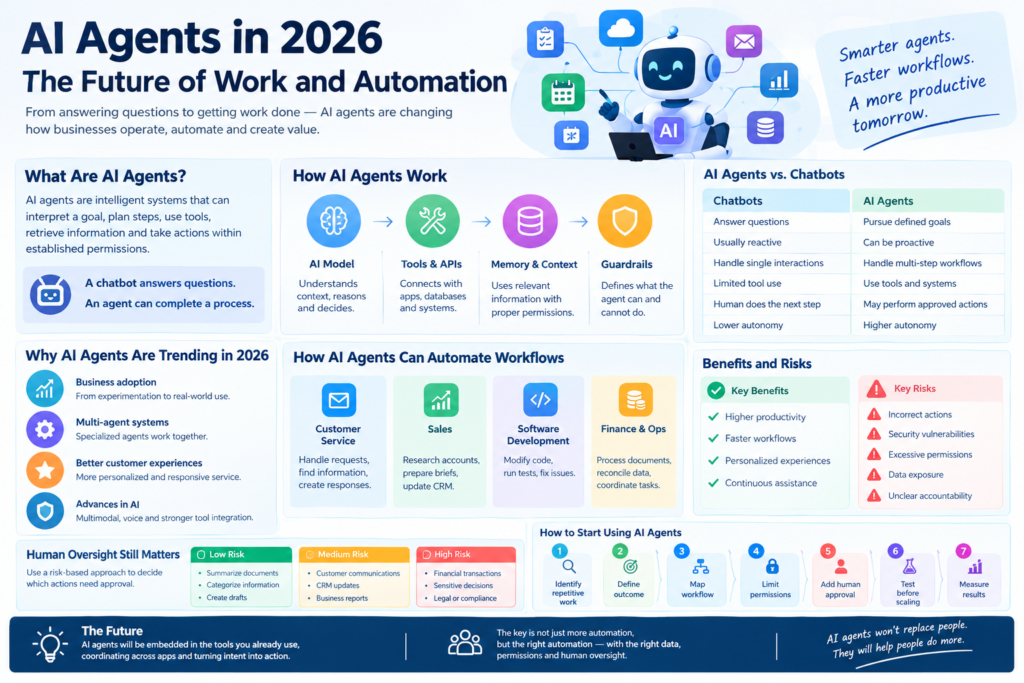
AI agents in the future of work and business automation
AI agents are becoming a major part of the future of work and automation. In 2026, businesses are exploring how these intelligent systems can handle repetitive tasks, coordinate workflows, use software tools, and support employees while keeping humans involved in important decisions.
AI agents are designed to do more than respond to a prompt. They can interpret a goal, plan multiple steps, use connected tools, retrieve information, and take actions within defined boundaries.
This does not mean every workplace will become fully autonomous.
Instead, the important change is that AI is moving from answering questions to helping complete work.
What Are AI Agents?
An AI agent is a software system that can pursue a specific goal by interpreting information, deciding what to do next, using available tools, and taking actions within established permissions.
A traditional AI chatbot might answer:
“What is our company’s refund policy?”
An AI agent could potentially handle a longer workflow:
- Identify the customer.
- Retrieve the relevant order.
- Check the refund policy.
- Determine whether the order meets the criteria.
- Prepare the appropriate response.
- Request human approval when necessary.
- Update the relevant system if authorized.
The important difference is the workflow.
A chatbot primarily provides an answer.
An agent can participate in a process.
How Do AI Agents Work?
AI agents generally combine several components.
AI Model
The underlying AI model interprets instructions, understands context, reasons about possible actions, and produces outputs.
The model provides the intelligence required to understand the task.
Tools and APIs
Tools allow an agent to interact with external systems.
Depending on the use case, an agent may have controlled access to:
- Databases
- Search systems
- Calendars
- CRM software
- Project-management platforms
- Internal documents
- Business applications
- APIs
Without tools, an AI system may be limited largely to generating information.
With tools, it can potentially perform actions.
Memory and Context
Agents also need relevant context.
For a business workflow, that could include customer information, company policies, previous conversations, documents, or project information.
However, access to context should be controlled carefully.
More information does not automatically mean better results.
The agent needs the right information, at the right time, with appropriate permissions.
Guardrails
Guardrails define what the agent can and cannot do.
For example, an AI agent might be allowed to draft a customer email but require human approval before sending it.
It might be able to read an internal database but not delete records.
These controls become increasingly important as AI systems move from generating content toward taking real-world actions.
AI Agents vs. Chatbots: What’s the Difference?
AI agents and chatbots are related, but they serve different purposes.
| Chatbots | AI Agents |
|---|---|
| Primarily answer questions | Can pursue defined goals |
| Usually reactive | Can be proactive within boundaries |
| Often handle individual interactions | Can handle multi-step workflows |
| Limited tool use in many implementations | Designed to use tools and systems |
| Human often performs the next step | Agent may perform approved actions |
| Lower autonomy | Potentially higher autonomy |
The distinction is not absolute.
Some modern chatbots already use tools and can perform actions.
The useful way to think about the difference is how much of the workflow the system can responsibly handle.
Why Are AI Agents Trending in 2026?
The rise of AI agents reflects a broader shift in how companies think about artificial intelligence.
Businesses are moving from experimentation toward practical deployment.
AI agents can support employee productivity, multi-step workflows, customer experiences, research, software development, and other business processes.
The common theme is simple:
AI is increasingly being designed to perform work rather than simply generate responses.
How AI Agents Can Automate Business Workflows
One of the strongest applications of agentic AI is workflow automation.
A traditional automated workflow might follow a fixed sequence:
Trigger → Step 1 → Step 2 → Step 3 → Result
An AI-powered workflow can potentially interpret information at each stage and determine the next appropriate action.
For example:
Customer request → AI reads request → Retrieves customer information → Checks policy → Drafts response → Requests approval → Updates system
This can be useful when every case is not identical but the organization still follows a defined process.
Customer Service
AI agents can assist customer-service teams by:
- Classifying incoming requests
- Searching knowledge bases
- Retrieving account information
- Summarizing customer history
- Drafting responses
- Routing complex cases
- Creating follow-up tasks
The human employee can focus on unusual, sensitive, or high-value cases.
Sales
Sales teams can use AI agents for research and workflow support.
Possible tasks include:
- Researching accounts
- Preparing meeting briefs
- Summarizing customer interactions
- Updating CRM records
- Identifying follow-up actions
- Drafting outreach
The goal is not necessarily to automate the salesperson.
It is to reduce administrative work surrounding the sales process.
Software Development
AI agents are also increasingly relevant to software development.
Instead of asking an AI to generate one function, developers can give an agent a larger objective.
The agent may inspect a codebase, modify files, run tests, identify failures, and revise its approach.
Human developers still need to review important changes, especially where security, architecture, reliability, or business logic is involved.
Finance and Operations
Internal business functions may also benefit from agentic automation.
Potential use cases include:
- Report preparation
- Document processing
- Invoice workflows
- Procurement support
- Data analysis
- Internal knowledge retrieval
- Routine reconciliation
- Operations coordination
These applications can be especially valuable when employees currently spend significant time moving information between systems.
What Are Multi-Agent Systems?
A multi-agent system uses multiple AI agents with different responsibilities rather than asking one agent to perform everything.
For example:
Research Agent → Analysis Agent → Verification Agent → Reporting Agent
Each agent can have a specific role.
A research agent might gather information.
An analysis agent could evaluate it.
A verification agent could check whether important claims meet predefined criteria.
A reporting agent could organize the final output.
The advantage is specialization.
Instead of one system handling every part of a complicated workflow, different agents can focus on different stages.
However, multi-agent systems also introduce additional complexity.
More agents mean more communication, more dependencies, more opportunities for errors, and more governance requirements.
So businesses should not use multiple agents simply because the technology allows it.
Use them when specialization provides a clear benefit.
What Are the Benefits of AI Agents?
Higher Productivity
AI agents can potentially reduce time spent on repetitive digital tasks.
Employees can delegate appropriate work instead of manually completing every step.
Faster Workflows
When an agent can retrieve information and move between approved systems, some processes can become faster.
The greatest benefit may come from eliminating unnecessary handoffs between people and software.
More Personalized Customer Experiences
Agents can use relevant customer context to support more individualized interactions.
This can help organizations move beyond scripted responses toward more context-aware service.
Continuous Assistance
Traditional software waits for a person to open it and perform a task.
An agent can potentially monitor an approved workflow and respond when specific conditions are met.
This is particularly useful for recurring processes.
What Are the Risks of AI Agents?
Greater autonomy creates greater risk.
An AI system that only drafts a paragraph has limited authority.
An AI agent that can access company databases, send emails, modify records, or initiate transactions has much greater potential impact.
Important risks include:
- Incorrect actions
- Security vulnerabilities
- Excessive permissions
- Data exposure
- Prompt injection
- Poor decision-making
- Inaccurate information
- Unclear accountability
- Difficult-to-monitor workflows
This is why AI governance needs to develop alongside AI capability.
Why Human Oversight Still Matters
AI agents should not automatically receive unrestricted authority.
A useful model is to classify actions by risk.
Low-Risk Actions
The agent may be able to perform these automatically.
Examples:
- Summarizing documents
- Categorizing information
- Creating drafts
- Organizing internal notes
Medium-Risk Actions
The agent can prepare the action, but a human may review it.
Examples:
- Customer communications
- CRM updates
- Business reports
- Internal recommendations
High-Risk Actions
Human approval should remain central.
Examples may include:
- Significant financial transactions
- Sensitive employee decisions
- Destructive database changes
- High-impact legal or compliance decisions
- Actions involving highly sensitive information
The exact boundaries depend on the organization, workflow, jurisdiction, and consequences of error.
How Businesses Should Start Using AI Agents
Companies do not need to automate an entire department.
A better approach is to start with one clearly defined workflow.
Step 1: Identify Repetitive Work
Look for processes employees perform frequently.
Step 2: Define the Desired Outcome
Describe what successful completion looks like.
Step 3: Map the Workflow
Document:
- Inputs
- Decisions
- Tools
- Approvals
- Outputs
- Exceptions
Step 4: Limit Permissions
Give the agent only the access required for the task.
Step 5: Add Human Approval
Define exactly which actions require human review.
Step 6: Test Before Scaling
Use realistic scenarios and edge cases.
Do not evaluate an agent only on successful demonstrations.
Test what happens when information is missing, contradictory, malicious, or unexpected.
Step 7: Measure Business Results
Track meaningful outcomes such as:
- Completion time
- Error rates
- Customer outcomes
- Employee time saved
- Cost
- Escalation rates
- Quality
- Adoption
The objective is not to deploy an impressive AI demo.
The objective is to improve a real workflow.
What Skills Will Workers Need in an Agentic AI Workplace?
AI agents may change the skills employees need.
Technical AI knowledge can help, but employees also need the ability to work effectively with AI systems.
Important skills include:
- AI literacy
- Critical thinking
- Workflow design
- Data awareness
- Verification
- Communication
- Problem solving
- Domain expertise
- Risk assessment
AI training should not focus only on writing better prompts.
Employees should understand when to use AI, how to evaluate its work, and when human judgment must take over.
The Future of AI Agents
The future of AI agents is likely to involve deeper integration with business software.
Instead of using AI as a separate application, employees may increasingly interact with agentic systems through the tools they already use.
Agents could coordinate across:
- CRM
- Calendars
- Documents
- Databases
- Communication platforms
- Business applications
This could make software increasingly intent-driven.
Instead of thinking:
“Which application should I open?”
a user may increasingly think:
“What outcome do I need?”
The AI system can then determine which approved tools and workflows are needed.
That is a significant change in how people may interact with software.
AI Agents Are Not a Replacement for Good Processes
One of the biggest mistakes businesses can make is adding AI to a poorly designed workflow.
If a process is confusing, fragmented, or dependent on undocumented human knowledge, an AI agent may simply automate the confusion.
Before deploying an agent, organizations should ask:
- Is the process clearly defined?
- Is the required information accessible?
- Are responsibilities clear?
- Are approval thresholds documented?
- Can outcomes be measured?
- Are exceptions understood?
AI agents work best when the organization understands the work being delegated.
Conclusion
AI agents are becoming one of the defining AI trends of 2026 because they move artificial intelligence from simple assistance toward task execution and workflow automation.
The technology can help businesses automate repetitive processes, support employees, improve customer service, accelerate research, and coordinate complex digital work.
But greater autonomy also creates greater responsibility.
The strongest implementations will not simply give AI more power.
They will give AI the right power, over the right tasks, with the right data, permissions, monitoring, and human oversight.
For businesses considering agentic AI, the best place to start is not with the question:
“How much can we automate?”
Start with:
“Which workflow can AI improve safely and measurably?”
That shift—from technology-first experimentation to outcome-focused implementation—will determine whether AI agents become genuinely useful business systems or simply another layer of workpl